
AI transcription guide · 11 min read
Automatic vs. Manual Transcription: What Works Best?
Compare automatic, manual, and hybrid transcription by accuracy, speed, cost, and audio quality to choose the right workflow.
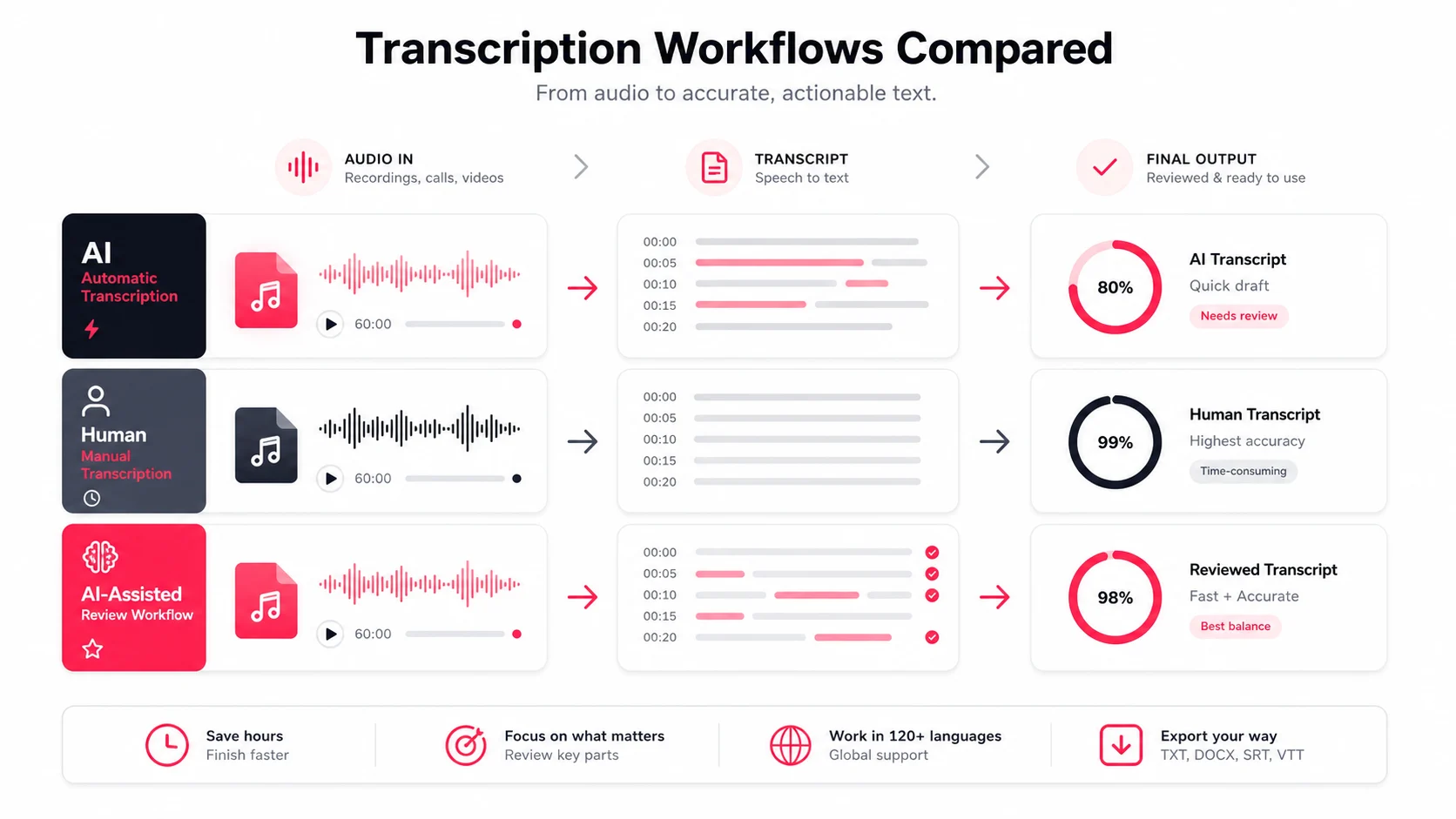
If you need text fast, start with automatic transcription. If every word must be exact, use manual review. If you need speed and confidence, use a hybrid workflow.
The decision comes down to five checks: accuracy, speed, cost, audio quality, and editing time. Automatic transcription can turn a long recording into searchable text in minutes. Manual transcription gives a reviewer complete control, but takes much longer and costs more. A hybrid workflow uses AI for the first draft and reserves human attention for names, numbers, quotes, and high-risk sections.
Before choosing, ask what the transcript will be used for. Internal meeting notes do not carry the same risk as a legal record. A draft podcast transcript does not need the same review standard as captions published under a company name.
Spotlight Session: Combining Automated Transcription with Human Interpretation
A hybrid workflow is not a compromise in quality. It is a way to spend review time where it matters.
- Generate the first transcript automatically.
- Review the opening minutes to confirm language and speaker labels.
- Search for names, dates, figures, and technical terms.
- Listen again only around important or uncertain passages.
- Export the reviewed transcript or subtitle file.
This approach avoids typing every word by hand while keeping a person responsible for the final meaning.
Quick Comparison
| Method | Best for | Typical turnaround | Cost | Main trade-off |
|---|---|---|---|---|
| Automatic | Meetings, lectures, drafts, internal notes | Minutes | Low | Hard audio needs cleanup |
| Manual | Legal, medical, research, official records | Hours or days | High | Slow and difficult to scale |
| Hybrid | Interviews, podcasts, captions, public content | Same day | Mid-range | Still requires focused review |
In short: use automatic transcription for scale, manual transcription for exactness, and hybrid transcription for most high-visibility work.
Automatic Transcription: Strengths, Limits, and Best Uses
Accuracy, Speed, and Cost for High-Volume Work
Automatic transcription is strongest when you have many recordings and need useful text quickly. Meetings, webinars, interviews, lectures, and creator videos become searchable without a person replaying the entire file.
Audio quality is the largest variable. A close microphone, steady volume, and one person speaking at a time improve results. Echo, music, strong compression, cross-talk, and distant speakers create more cleanup.
The cost advantage becomes significant at volume. A team can process a backlog of recordings, then review only the files or passages that matter.
Speaker Labels, Language Support, and Editing Tools
Modern transcription is more than raw speech-to-text. A practical workspace should include:
- Timestamped transcript segments
- Search and playback from the selected line
- Speaker labels that can be renamed
- Translation and subtitle workflows
- Summary and action-item prompts
- TXT, Markdown, SRT, and VTT exports
Speaker detection should be treated as an editable first pass. Platform captions may not contain speaker information, and even audio diarization can split or merge speakers incorrectly. The editor matters as much as the first model output.
When Automatic Transcription Is the Right Call
Automatic transcription is usually the right starting point for:
- Team meetings and standups
- Lectures and training recordings
- Customer or research interviews
- Podcast drafts and show notes
- YouTube and social video captions
- Searchable internal archives
If the transcript is mainly used to find information, create a recap, or prepare a first draft, automatic transcription provides the best balance of speed and cost.
Manual Transcription: When Precision and Control Come First
Where Manual Transcription Outperforms AI
Manual transcription is appropriate when a small wording error can change a decision or create legal, medical, financial, or reputational risk.
A trained reviewer can interpret difficult accents, domain-specific language, poor recordings, interrupted speech, and implied context. They can also follow a strict style guide for verbatim speech, hesitations, non-speech sounds, or redaction.
The Trade-Offs: Time, Cost, and Scale
The trade-off is throughput. Manual transcription requires someone to replay, pause, type, rewind, and proofread. One hour of audio can take several hours to complete, and a large backlog quickly becomes expensive.
Manual work is therefore best reserved for records that genuinely require it, rather than applied to every meeting or draft.
When Manual Transcription Makes More Sense
Choose manual transcription or full human review for:
- Legal testimony and official statements
- Medical or clinical documentation
- Research quotes that must be exact
- Compliance calls and regulated records
- Poor audio where AI misses the context
- Final publication under a strict editorial standard
Automatic vs. Manual vs. Hybrid: A Direct Comparison by Use Case
Side-by-Side Comparison Table
| Use case | Recommended workflow | Why |
|---|---|---|
| Internal meeting notes | Automatic | Fast, searchable, easy to summarize |
| Customer interview analysis | Hybrid | Fast draft with reviewed quotes and speakers |
| Lecture or training archive | Automatic | Search matters more than perfect verbatim text |
| Podcast publication | Hybrid | Spoken text needs editorial cleanup |
| Legal or medical record | Manual | Exact wording and accountability matter |
| Video captions | Hybrid | Timing can be automatic; public text needs review |
Which Method Fits Meetings, Interviews, Lectures, Podcasts, and YouTube Videos
Meetings and lectures usually benefit from automatic transcription because the main goal is recall and search. Interviews often need hybrid review because names, quotes, and speaker identity matter. Podcasts and YouTube videos also benefit from a hybrid pass before captions or articles are published.
The deciding factor is not the media type alone. It is the consequence of an error.
Why Hybrid Workflows Often Give the Best Balance
Hybrid transcription gives the team a complete draft quickly and turns review into a targeted task instead of a full rewrite. With EasyScribe, the practical workflow is:
- Upload audio or video or paste a supported media link
- Review the transcript beside the source
- Rename speakers and correct important terms
- Generate a summary or action items
- Export the final text or subtitles
Conclusion: A Simple Framework for Choosing the Right Transcription Method
Use automatic transcription when speed and search matter most. Use manual transcription when the transcript itself is the official record. Use a hybrid workflow when the content will be quoted, shared with clients, published, translated, or converted into subtitles.
The best process is not the one with the highest theoretical accuracy. It is the one that produces a trustworthy result at the speed and cost your work allows.
FAQs
How do I choose between automatic, manual, and hybrid transcription?
Use automatic transcription for fast drafts and searchable records, manual transcription for high-risk exact records, and a hybrid workflow for published or client-facing content.
When is AI transcription accurate enough to use on its own?
It is usually suitable for internal notes when the audio is clean and small wording errors are acceptable. Review names, numbers, jargon, and important quotes before publishing.
What makes a hybrid workflow worth the extra review time?
AI removes most of the typing while human review catches the small errors that affect meaning, speaker identity, or public credibility.